The whiteboard
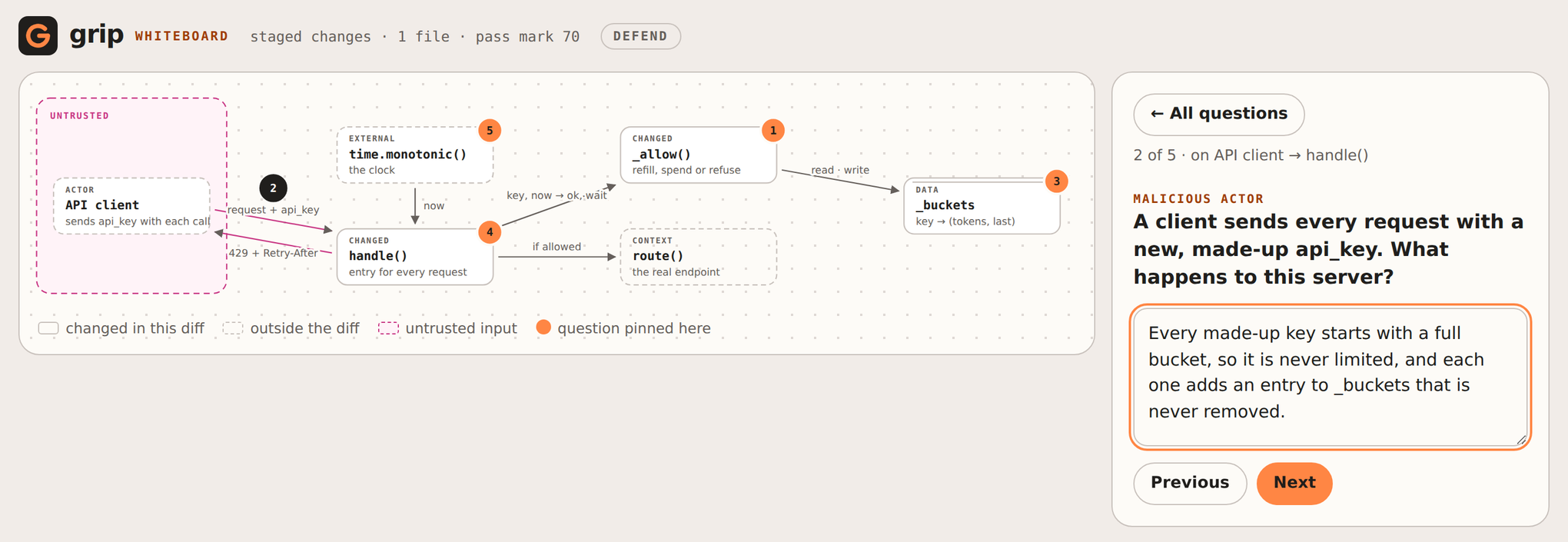
grip whiteboard is the whiteboard defense as a command. grip
draws your change the way you would sketch it for a colleague: its parts, how they
connect, which inputs are untrusted. It pins five questions to the drawing and opens it in
your browser. Click a part, answer, hand in.
From the hook
The command is one way in; the git hook is the other. Set hook_mode and every commit or
push the hook guards is defended on the board instead of quizzed in the terminal:
The hook prints the address, opens the browser and waits for you to hand in. A pass lets the push through; a score below the mark blocks it, and the page shows what each answer missed. Where no browser can be opened (over SSH, no display) the hook asks in the terminal as usual. Retrying the same diff reuses the board, so only the grading runs again.
What it asks
Every board asks three things, and two more when the change calls for them:
| Question | When |
|---|---|
| Why this way: why X and not Y; the model has to name a real alternative | always |
| Where it fails: the input, load or state that breaks it | always |
| How you know: how you would show it works | always |
| Malicious actor: what a hostile caller, input or tenant can do | the change takes untrusted input |
| Data structure: why this representation, and what it costs | the change adds or changes data |
| How it works: what the change does, in your words | fills any slot left |
Five questions, 20 points each. The Grip Score and the pass mark mean exactly what they mean
for grip quiz, and a pass is remembered for the diff, so the push hook and the Claude
Code push gate let it through.
Reading the board
- Solid boxes are code the diff changes. Dashed boxes are outside it: callers, services, the code it calls.
- The pink area holds untrusted input. Arrows crossing into it are where the malicious-actor question usually sits.
- Numbered pins are the questions. After you hand in, each pin and the box it sits on turn green, yellow or red, and the panel shows what each answer missed.
Interview mode
For the person doing the pulling aside. The rubric for each question is visible and has a checkbox per point: ask aloud, tick what you hear, hand in for a score. Nothing is recorded and the answers never go to a model, so it works for a review over coffee as well as for a pairing session.
Sharing a board
Writes one self-contained page with the drawing and the questions, without rubrics and without grading. Attach it to a pull request so reviewers know what the author should be able to defend.
From a coding agent
/grip-whiteboard in Claude Code, Codex, Gemini CLI or Cursor starts the whiteboard and
waits. You answer in the browser, so your answers never pass through the agent's
conversation; the agent reports the score at the end. See coding agents.
How it is built
- One model call draws the board. grip checks it before showing anything: every arrow and
pin points at a real part, every changed part names files that are in the diff, and the
required questions are there. If the board fails a check, grip asks once more with the
problems listed, then falls back to telling you to run
grip quiz. - grip lays the board out itself, so the same board always looks the same.
- The page is served on
127.0.0.1on a random port, behind a random token. It accepts only its own address asHostandOrigin, and its Content-Security-Policy allows nothing but its own inline script and style. Rubrics never reach the page in defend mode. - Everything the model wrote is shown as text, never as markup, so a diff that tries to inject a script into the drawing only gets a strange label.
- Like the terminal quiz, it cannot stop someone on your machine from answering for you: a program that can read the address can post to it. grip checks understanding; it is not an exam proctor.
The full design, including the decisions and where it fails, is in Design: grip whiteboard.